ESP32 Jukebox
/ 8 min read
Updated:Motivation
Recently I got an ESP32 kit and I have begun playing around with it. I have plans to eventually build a remote control car with it but for now, I am focusing on smaller projects to build up my skills and experience.
I tried different tutorials that came with the Freenove kit and the idea of making some music player with limited hardware seemed appealing to me. While I have little knowledge on how to do it, I figured I’d give it a shot as the kit came with passive buzzer.
The Jukebox
The full circuit can be seen below. It consists of the speaker which is controlled by using a transistor. An LED array that shows which track is selected. The track selection itself is controlled by a potentiometer, where its voltage is read and mapped to a digital value. The LED crystal display also shows further information about the selected track. The selected melody is played by pressing the button.
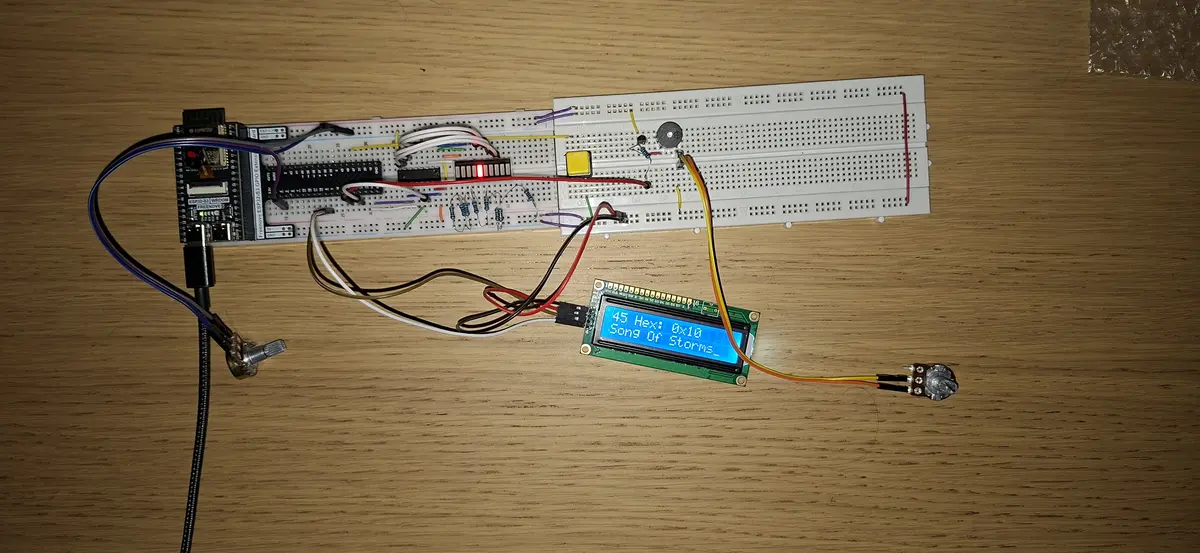
Digital Breadboard Model
While my circuit looks great, it looks a bit messy. A better idea can be gotten by looking at its digital representation.
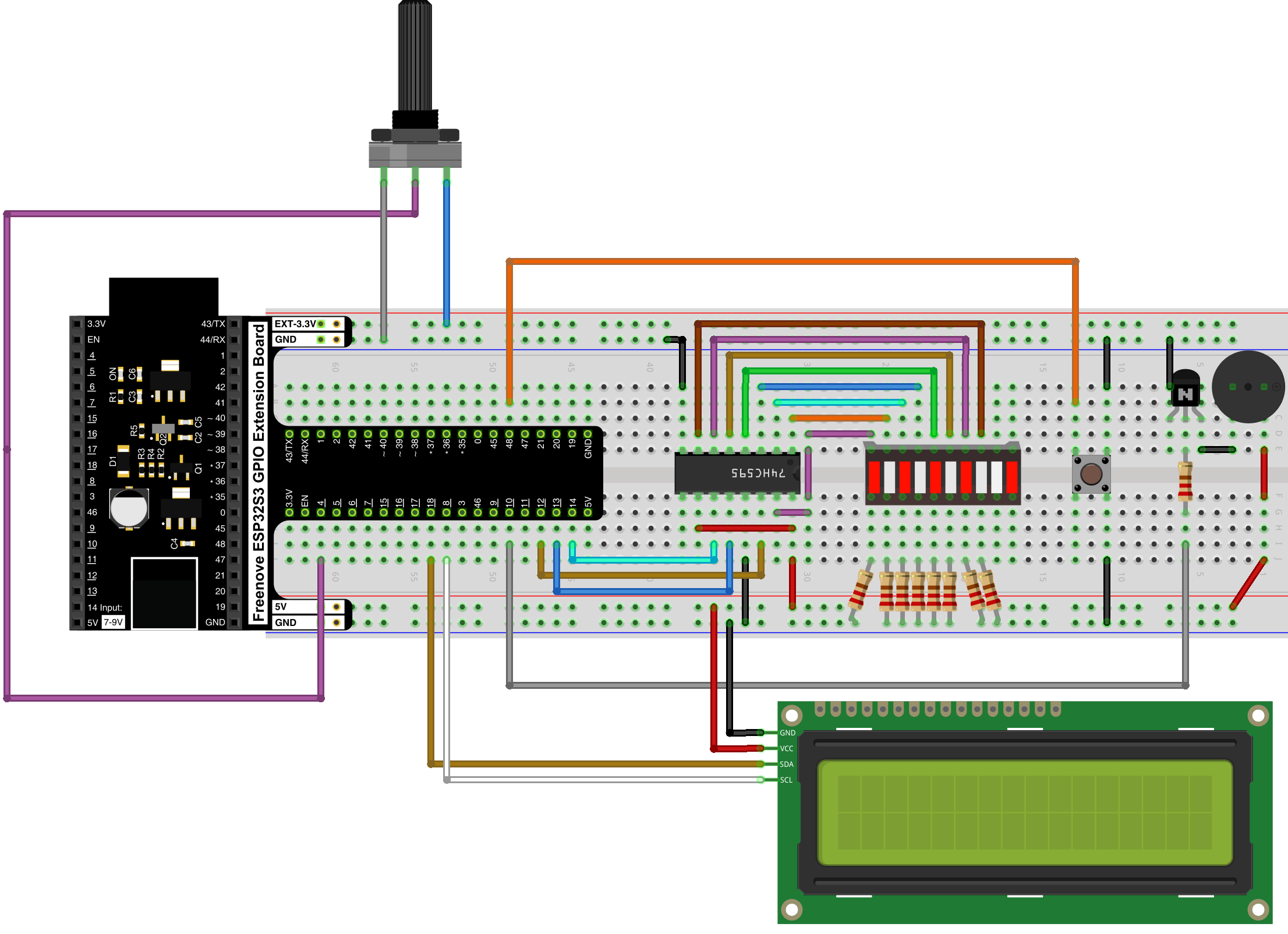
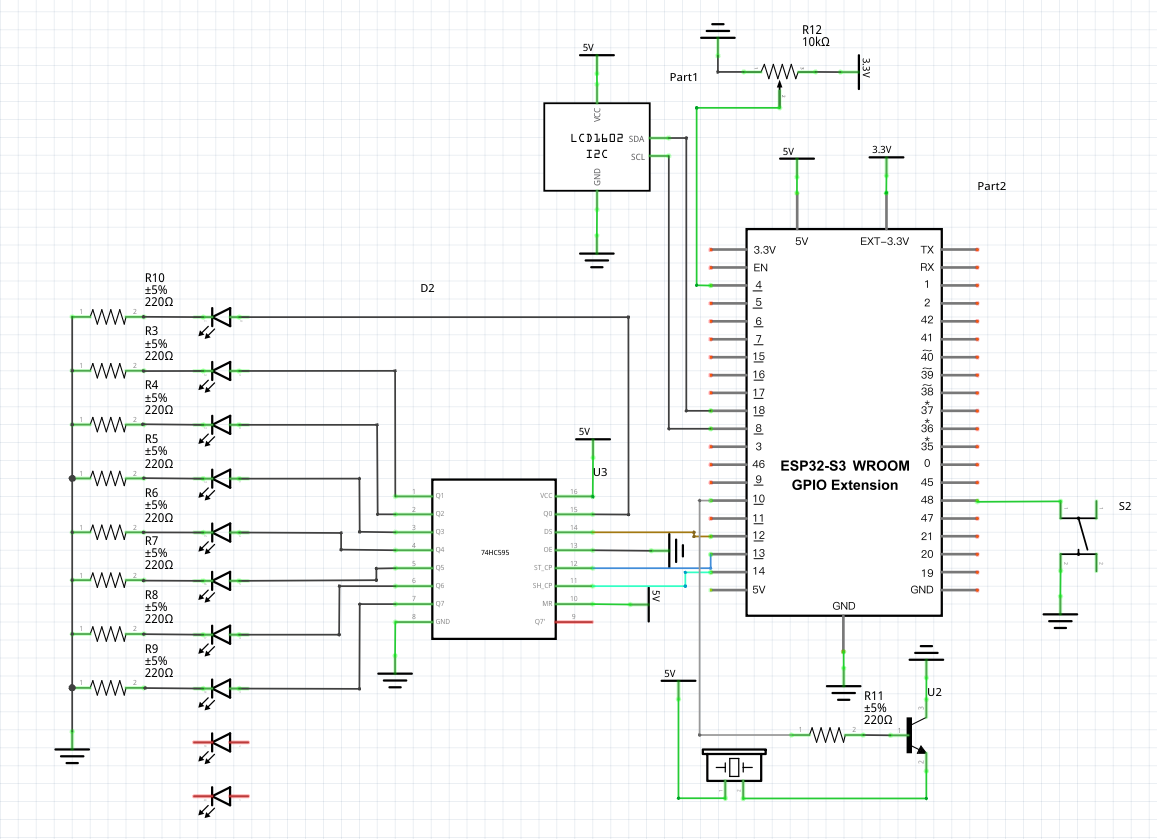
Circuit Diagram
Furthermore my wiring can be messy to so a circuit diagram will paint an clear picture of what is actually going on.
Part List
| Amount | Part Name |
|---|---|
| 9 | 220Ω Resistor |
| 1 | 74HC595 |
| 1 | Passive Buzzer |
| 1 | Freenove ESP32 S3 GPIO Extension |
| 1 | Freenove ESP32 S3 WROVER |
| 1 | LCD1602-I2C |
| 1 | LED GRAPH |
| 1 | Pushbutton |
| 1 | Rotary Potentiometer |
| 1 | NPN Transistor |
How it works
Putting it together is one thing, but understanding how it works is another. I will try my best to break down how this system ultimately makes sound
Making sound
Since I am using a passive buzzer, it needs an oscilating input to produce the correct noise. Unlike an active buzzer, it doesn’t have an internal oscillator and doesn’t work off of a steady DC input. The passive buzzer moves a piezoelectric element at a set frequency. By using pulse width modulation (PWM) we can send square wave to quickly toggle the buzzer on and off. By connecting the ground of the buzzer to a transistor, we can the control flow of electricity into the buzzer using software. If we to toggle the buzzer on and off at a certain frequency, it makes a distinct note. I made a table of some frequencies for the basic notes.
| Note | Frequency (Hz) |
|---|---|
| C4 | 261.63 |
| D4 | 293.66 |
| E4 | 329.63 |
| G4 | 392.00 |
| A4 | 440.00 |
| C5 | 523.25 |
Playing a frequency
First we have to setup the our a PWM for a specific channel with a frequency and a bit resolution. Then we have to map a GPIO pin to that channel.
void Jukebox::begin() { ledcSetup(_channel, 5000, 8); ledcAttachPin(_pin, _channel);}After this, I defined a function that plays the frequency for a set duration. This duration is the duration of the note. Quicker notes have a shorter duration while longer ones have a longer one… A bit self explanatory but its important to mention. By varying the note lengths many unique songs can be produced. While we aren’t playing anything we want to play a note at a frequency of 0, AKA nothing. It is possible to reduce the effect of notes bleeding into eachother by allowing the buzzer to come to a rest. By utilising a 95/5 split, a legato gap is created. There are other types of gaps that can be made by using different timings. One of these is called a staccato gap which has a more articulated gap with a 70/30 split.
void Jukebox::play_tone(int frequency, int duration) {
if (frequency == NOTE_REST) { ledcWriteTone(_channel, 0); } else { ledcWriteTone(_channel, frequency); }
delay(duration * 0.95); ledcWriteTone(_channel, 0); delay(duration * 0.05);}So putting this all together we can play a simple intro tune using our basic notes.
void Jukebox::play_intro() { static const int melody[] PROGMEM = {NOTE_C4, NOTE_E4, NOTE_G4, NOTE_C5}; static const int beats[] PROGMEM = {200, 200, 200, 400};
int length = sizeof(melody) / sizeof(int);
for (int i = 0; i < length; i++) { play_tone(melody[i], beats[i]); }}Songs
Below are some songs that I got working on my ESP Jukebox. The durations are the note timings. By doing some division you can get the actual length of the note in miliseconds.
| Number | Note Name (American) | Note Name (British/Classical) | Relative Duration |
|---|---|---|---|
| 8 | Eighth Note | Quaver | |
| 4 | Quarter Note | Crotchet | |
| 2 | Half Note | Minim | |
| 1 | Whole Note | Semibreve |
This disregards the BPM of songs so some songs might seem off. I just messed around with the note duration until it sounded more or less right.
Playing the array of melodys and durations require a simple helper for-loop.
void Jukebox::play_array(const int melody[], const int duration[], int len) { for (int i = 0; i < len; i++) { int noteDuration = 1000 / duration[i]; play_tone(melody[i], noteDuration); }}With the length being calculated as such:
int len = sizeof(melody) / sizeof(int);Für Elise
Für Elise by Ludwig van Beethoven
static const int melody[] PROGMEM = {    NOTE_E5,   NOTE_DS5, NOTE_E5,  NOTE_DS5, NOTE_E5,    NOTE_B4,   NOTE_D5,  NOTE_C5,  NOTE_A4,    NOTE_REST, NOTE_C4,  NOTE_E4,  NOTE_A4,  NOTE_B4,    NOTE_REST, NOTE_E4,  NOTE_GS4, NOTE_B4,  NOTE_C5,    NOTE_REST, NOTE_E4,    NOTE_E5,   NOTE_DS5, NOTE_E5,  NOTE_DS5, NOTE_E5,    NOTE_B4,   NOTE_D5,  NOTE_C5,  NOTE_A4,    NOTE_REST, NOTE_C4,  NOTE_E4,  NOTE_A4,  NOTE_B4,    NOTE_REST, NOTE_E4,  NOTE_C5,  NOTE_B4,  NOTE_A4
};
static const int durations[] PROGMEM = {    8, 8, 8, 8, 8, 8, 8, 8, 4,    8, 8, 8, 8, 4, 8, 8, 8, 8, 4, 8, 8, 8, 8, 8, 8,    8, 8, 8, 8, 4, 8, 8, 8, 8, 4, 8, 8, 8, 8, 4};
Song of Storms
Song of Storms from Legend of Zelda: Ocarina of Time.
static const int melody[] PROGMEM = {    NOTE_D4, NOTE_F4, NOTE_D5, NOTE_D4, NOTE_F4, NOTE_D5, NOTE_E5,    NOTE_F5, NOTE_E5, NOTE_F5, NOTE_E5, NOTE_C5, NOTE_A4, NOTE_A4,
    NOTE_A4, NOTE_D4, NOTE_F4, NOTE_G4, NOTE_A4, NOTE_A4, NOTE_A4,    NOTE_D4, NOTE_F4, NOTE_G4, NOTE_E4, NOTE_E4,
    NOTE_D5, NOTE_D4, NOTE_F4, NOTE_D5, NOTE_E5,    NOTE_F5, NOTE_E5, NOTE_F5, NOTE_E5, NOTE_C5, NOTE_A4, NOTE_A4,
    NOTE_A4, NOTE_D4, NOTE_F4, NOTE_G4, NOTE_A4, NOTE_A4, NOTE_D4
};
static const int durations[] PROGMEM = {    8, 8, 2, 8, 8, 2, 4, 8, 8, 8, 8, 8, 4, 4,
    4, 4, 8, 8, 2, 4, 4, 4, 8, 8, 2, 4,
    8, 8, 2, 8, 8, 2, 4, 8, 8, 8, 8, 8, 4, 4,
    4, 4, 8, 8, 2, 4, 2};
The Legend of Zelda Main Theme
The Legend of Zelda Main Theme from The Legend of Zelda Franchise.
This one isn’t the best and kind of diviates around note 27. I am not bothered to put more work into it.
static const int melody[] PROGMEM = {  NOTE_AS4, NOTE_F4, NOTE_AS4, NOTE_AS4, NOTE_C5, NOTE_D5, NOTE_DS5,  NOTE_F5, NOTE_REST, NOTE_F5, NOTE_F5, NOTE_FS5, NOTE_GS5, NOTE_AS5,  NOTE_REST, NOTE_AS5, NOTE_AS5, NOTE_GS5, NOTE_FS5, NOTE_GS5, NOTE_FS5,  NOTE_F5,
  NOTE_F5, NOTE_DS5, NOTE_DS5, NOTE_F5, NOTE_FS5,  NOTE_F5, NOTE_DS5, NOTE_CS5, NOTE_DS5, NOTE_CS5, NOTE_C5, NOTE_AS4,  NOTE_C5, NOTE_D5, NOTE_F5, NOTE_G5, NOTE_A5, NOTE_AS5};
static const int durations[] PROGMEM = {  1, 2, 4, 8, 8, 8, 8, 1, 8, 4, 8, 8, 8, 1, 8, 4, 8, 8, 8, 4, 8, 1,
  2, 4, 8, 8, 1, 2, 4, 8, 8, 4, 4, 2, 2, 2, 2, 4, 4, 1};
Super Mario Bros. Theme
The original Super Mario Bros. Theme for the NES.
static const int melody[] PROGMEM = { NOTE_E5, NOTE_E5, NOTE_REST, NOTE_E5, NOTE_REST, NOTE_C5, NOTE_E5, NOTE_REST, NOTE_G5, NOTE_REST, NOTE_G4, NOTE_REST, NOTE_C5, NOTE_G4, NOTE_E4, NOTE_A4, NOTE_B4, NOTE_AS4, NOTE_A4, NOTE_G4, NOTE_E5, NOTE_G5, NOTE_A5, NOTE_F5, NOTE_G5, NOTE_E5, NOTE_C5, NOTE_D5, NOTE_B4};static const int durations[] PROGMEM = { 8, 8, 8, 8, 8, 8, 8, 8, 4, 4, 4, 4, 4, 4, 4, 8, 8, 8, 4, 4, 8, 8, 8, 4, 8, 8, 4, 8, 4};Tetris Soundtrack
The Tetris soundtrack for the Game Boy.
static const int melody[] PROGMEM = { NOTE_E5, NOTE_B4, NOTE_C5, NOTE_D5, NOTE_C5, NOTE_B4, NOTE_A4, NOTE_A4, NOTE_C5, NOTE_E5, NOTE_D5, NOTE_C5, NOTE_B4, NOTE_C5, NOTE_D5, NOTE_E5, NOTE_C5, NOTE_A4, NOTE_A4, NOTE_REST};static const int durations[] PROGMEM = { 4, 8, 8, 4, 8, 8, 4, 8, 8, 4, 8, 8, 4, 4, 4, 4, 4, 4, 4, 4};Happy Birthday
Classic happy birthday song.
static const int melody[] PROGMEM = {    NOTE_C4,  NOTE_C4,  NOTE_D4, NOTE_C4,    NOTE_F4,  NOTE_E4, // Happy Birthday to you    NOTE_C4,  NOTE_C4,  NOTE_D4, NOTE_C4,    NOTE_G4,  NOTE_F4, // Happy Birthday to you    NOTE_C4,  NOTE_C4,  NOTE_C5, NOTE_A4,    NOTE_F4,  NOTE_E4,  NOTE_D4, // Happy Birthday dear [Name]    NOTE_AS4, NOTE_AS4, NOTE_A4, NOTE_F4,    NOTE_G4,  NOTE_F4 // Happy Birthday to you};
static const int durations[] PROGMEM = {  8, 8, 4, 4, 4, 2, 8, 8, 4, 4, 4, 2, 8,  8, 4, 4, 4, 4, 4, 8, 8, 4, 4, 4, 2};
Star Wars Theme
The Star Wars main Theme from the original trilogy.
static const int melody[] PROGMEM = {    NOTE_G4, NOTE_G4, NOTE_G4,    NOTE_C5, NOTE_G5,    NOTE_F5, NOTE_E5, NOTE_D5,    NOTE_C6, NOTE_G5,    NOTE_F5, NOTE_E5, NOTE_D5,    NOTE_C6, NOTE_G5,    NOTE_F5, NOTE_E5, NOTE_F5,    NOTE_D5};
static const int durations[] PROGMEM = {    8, 8, 8,    2, 2,    8, 8, 8,    2, 4,    8, 8, 8,    2, 4,    8, 8, 8,    2};
The Imperial March
The Imperial March, aka Darth Vader’s Theme
static const int melody[] PROGMEM = {    NOTE_G4,  NOTE_G4,  NOTE_G4,  NOTE_DS4, NOTE_AS4,    NOTE_G4,  NOTE_DS4, NOTE_AS4, NOTE_G4,    NOTE_D5,  NOTE_D5,  NOTE_D5,  NOTE_DS5, NOTE_AS4,    NOTE_FS4, NOTE_DS4, NOTE_AS4, NOTE_G4};
static const int durations[] PROGMEM = {4, 4, 4, 6, 16,4, 6, 16, 2,4, 4, 4, 6, 16, 4, 6, 16, 2};