DualShock 4 as a steering wheel
/ 9 min read
Motivation
I play Assetto Corsa and the F1 games, and for a while I have exclusively played them with a DS4 controller. I wanted to try playing them with a gaming wheel, but I didn’t have one. So I did the logical next step and wrote a user-space driver that acts as a wheel, rather than buying an one.
I chose to do this in Rust, as I’ve written some CLI tools in it before, and I also wanted to do it in Rust.
Getting the data from the DS4 Controller
Vendor & Product IDs
First things first, we need to get the Vendor and Product ID. These are integer values that identify hardware manufacturers as well as their individual products.
$ lsusbBus 001 Device 037: ID 054c:09cc Sony Corp. DualShock 4 [CUH-ZCT2x]The 6th column is 054c:09cc. These are the IDs that represent the controller.
We can verify that we have the correct device as well.
Opening the device
We can read the data by making use of hidapi, well the Rust crate for it.
use hidapi::HidApi;
const VENDOR_ID: u16 = 0x054c;const PRODUCT_ID: u16 = 0x09cc;
fn main() -> <(), Box<dyn std::error::Error>> { let api = HidApi::new()?; let controller = api.open(VENDOR_ID, PRODUCT_ID)?; Ok(())}Reading the data
The data we are going to be reading is the raw binary data that is reported by the controller over USB. It is a series of bytes, each byte representing some aspect of the controller. We are interested in reading the accelerometer values.
The Accelerometer
Accelerometers measure acceleration relative to freefall using the principle described in Newton’s second law of motion.
In other words, it measures the relative force acting on a known mass. This can then be used to derive an equation that describes the mechanics of the accelerometer. calculate the acceleration the known mass is experiencing. You can read more about it here.
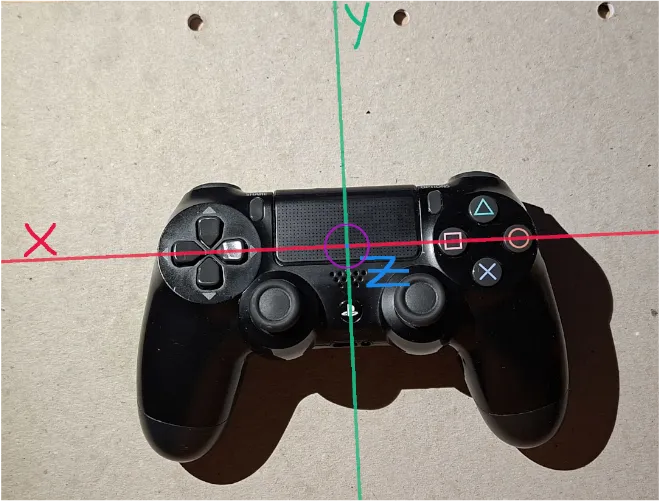
We can imagine that these accelerometers lie on these axes shown. With an known mass ball resting at some position.. Each axes has its own independent known mass.
Controller Axes
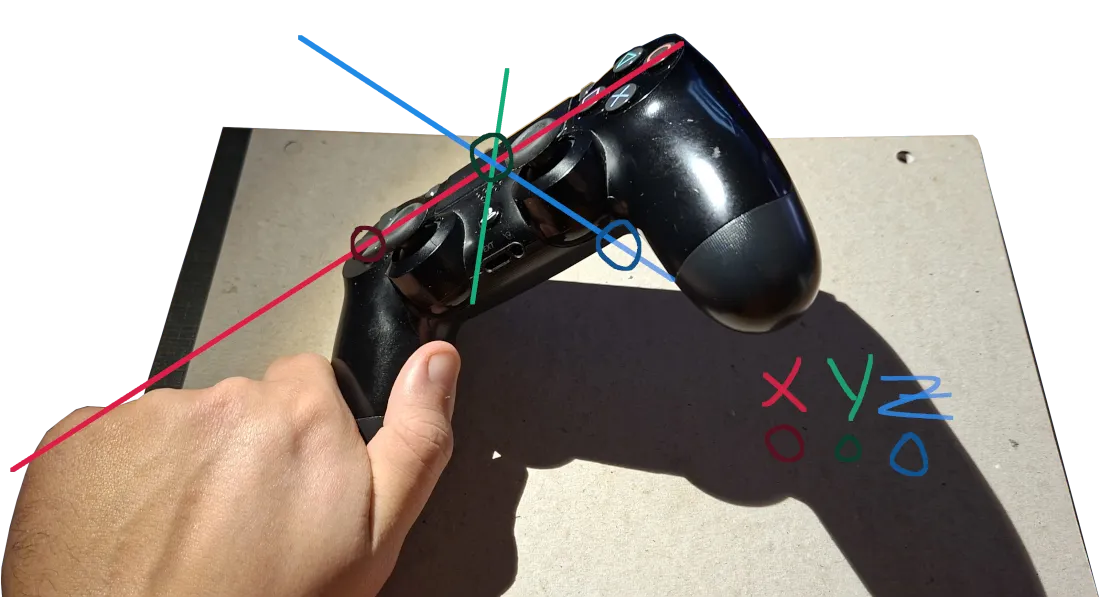
We can get an idea of how the accelerometers act by tilting the controller the side like this. This causes our known mass to shift.
Controller X Axis Example
Parsing the data
As mentioned above, the DS4 controller reports raw bytes over USB. To make sense of this,
we can read its report map. Our accelerometer X and Y data can be found by looking at bytes [19-20]
and [21-22]. More information can be found here.
From either looking at the report map, or investigating the max packet size that is reported at the
correct endpoint using lsusb -d 054c:09cc. We can see that 64 bytes of data is being report.
So lets declare a u8 buffer of size 64 and read some data into it.
const VENDOR_ID: u16 = 0x054c;const PRODUCT_ID: u16 = 0x09cc;
fn main() -> <(), Box<dyn std::error::Error>> { let api = HidApi::new()?; let controller = api.open(VENDOR_ID, PRODUCT_ID)?;
let mut buffer: [u8; 64] = [0; 64]; let n = controller.read(&mut buffer)?;
println!("Read {} bytes of data", n); println!("{:?}", &buffer[..n]);
Ok(())}Now when we run the program, we can see we have read 64 bytes of data from the controller.
$ cargo runRead 64 bytes of data[1, 124, 124, 120, 125, 8, 0, 20, 0, 0, 193, 233, 254, 247, 255, 253, 255, 1, 0, 185, 1, 98, 31, 21, 6, 0, 0, 0, 0, 0, 27, 0, 0, 0, 0, 128, 0, 0, 0, 128, 0, 0, 0, 0, 128, 0, 0, 0, 128, 0, 0, 0, 0, 128, 0, 0, 0, 128, 0, 0, 0, 0, 128, 0]Extracting our values after this is just a matter of simply indexing into the buffer at the right position. But wait, accelerometer X is split across 2 unsigned int bytes. To actually work with the value, we need to combine these 2 u8 values into 1 i16, little endian style. Since we have to do floating point operations to it we should convert it to a float32.
let accelo_x = i16::from_le_bytes([buffer[19], buffer[20]]) as f32;let accelo_y = i16::from_le_bytes([buffer[21], buffer[22]]) as f32;Calculating the steering angle
These values represent a point on their respective axes. Using triganomatry, the current steering angle can be found by getting the angle these 2 points create, assuming it creates a right angled triangle.
We could use atan to calulate the angle, but this we run into an issue as we don’t know what quadrant
we are in. Angling the controller forward+right, gives us an angle of ~-56 degrees. We get the same
reading if we angle the controller backwards+left. Left and right inputs are not usually interchangable.
Using atan2 we can perserve our quadrant location as well.
So using putting all of this together, we can finally figure out what angle of steering holding the DS4 Controller like this results in.
When holding the controller like this I get a reading of x: 4500, y:6500 , using these points we can calculate , our steering angle.
Example Problem
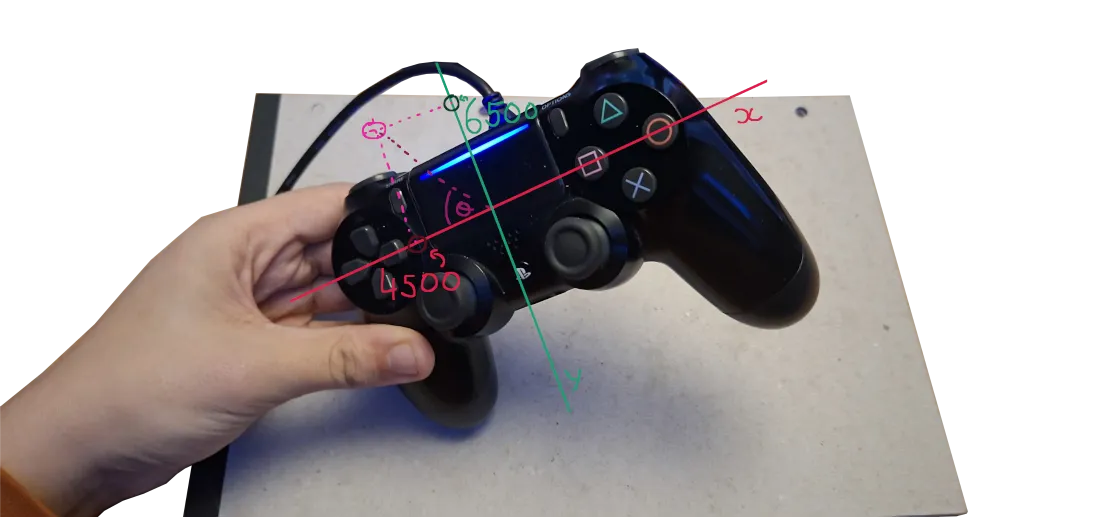
With just 1 line, we can calculate and prints its value.
let theta = accelo_y.atan2(accelo_x).to_degrees();println!("{}", theta);$ 55.304848When the controller is in a neutral position, its value is ~90. Since the x is closer to the origin, a right angle is almost formed.
Creating a virtual controller.
Now that we have our value, we should probably use it for something. The easiest way to use this as an input is to set up a virtual device. At this point, this becomes Linux specific. There are probably ways to do this on Windows and MacOS but I haven’t attempted any.
So very simple, we need to make a new virtual device, then using this we map our value to some component of it. To keep it as straight-forward as possible, I will be mapping it to the X axis of the left stick. This is normally used for taking steering inputs anyway.
You can check if uinput running with lsof | grep uinput. If nothing is returned, then it is
not running. It can be started with sudo modprobe uinput.
To stop the input from twitching, we can set a fuzz value, so angle deltas under this threshold do not send an update. But this has some adverse effects as 255 is not reached consistently.
const STEERING_FIZZ: i32 = 3;
let input_device = uinput::default()? .name("Virtual Gamepad")? .version(2 as u16) .event(uinput::event::absolute::Position::X)? .max(255) .min(0) .fuzz(STEERING_FIZZ) .create()?;Mapping the value to an axis
When the stick is at rest, it should be centered at ~ 127,127, unless you have want to implement stick drift.
The X and Y values of the stick range from [0..255], in other words one byte,
(). Our value range that we can calculate in degrees is [0..180].
Putting this all together, we can get a value that represents how far the controller is tilted left or right.
- To see which direction and by how much the controller is being tilted, subtract
the angle by 90. This gives us a new range of
[-90..90]. - Next, we can define how far we want our full lock to be, then dividing the angle by that max tilt angle.
- Clamp the number to keep it within
[-1..1] - Finally calculate how far from the center it is being displaced, then convert it to an int32 as as that is what uinput needs
const MAX_STEERING_ANGLE: f32 = 70.0;
let theta_normalised = (theta / MAX_STEERING_ANGLE).clamp(-1_f32, 1_f32);let steering_input = ((127.5 * theta_normalised) + 127.5) as i32;Updating the axis
Once you have your angle and your virtual device, it it is simple to broadcast this input to the device.
let _ = input_device.position(&uinput::event::absolute::Position::X, steering_input);let _ = input_device.synchronize();You can see what input is being sent to the controller with evtest
$ evtest/dev/input/event23: Virtual Gamepad$ Select the device event number [0-23]: 23Input driver version is 1.0.1Input device ID: bus 0x0 vendor 0x0 product 0x0 version 0x2Input device name: "Virtual Gamepad"Supported events: Event type 0 (EV_SYN) Event type 3 (EV_ABS) Event code 0 (ABS_X) Value 128 Min 0 Max 255Properties:Testing ... (interrupt to exit)Event: time 1768670026.160603, type 3 (EV_ABS), code 0 (ABS_X), value 127Using the virtual controller
Depending on the game, you can select what device to use. In Assetto Corsa you can map the steering axis to our new axis. Then you can use the default device driver for the rest of the inputs.
In other games, they might expect a fully mapped controller and are not happy with using multiple controllers at the same time. I ran into this issue when playing F1 2018. A fully mapped controlled can be found here.
Side note
When I was originally working on this idea, I noticed that one my controllers right trigger was not reading 255 on a full press. Instead it was reading 223. The sensor would read 0 until it passed around where 30 was on the left trigger. To fix this I multiplied it by , then clamped it. Even though it I would lose some precision in my input, at least I have the full range of it.
let fixed = (buffer[9] as f32 * 1.15).clamp(0_f32, 255_f32) as u8;Final Code
A link to the demo repository can be found here.
use hidapi::HidApi;
const VENDOR_ID: u16 = 0x054c;const PRODUCT_ID: u16 = 0x09cc;
const MAX_STEERING_ANGLE: f32 = 70.0;
const STEERING_FIZZ: i32 = 0;
fn main() -> Result<(), Box<dyn std::error::Error>> { let api = HidApi::new()?; let controller = api.open(VENDOR_ID, PRODUCT_ID)?; let mut input_device = uinput::default()? .name("Virtual Gamepad")? .version(2 as u16) .event(uinput::event::absolute::Position::X)? .max(255) .min(0) .fuzz(STEERING_FIZZ) .create()?; let mut buffer: [u8; 64] = [0; 64];
loop { let n = controller.read(&mut buffer)?;
println!("Read {} bytes of data", n);
let accelo_x = i16::from_le_bytes([buffer[19], buffer[20]]) as f32; let accelo_y = i16::from_le_bytes([buffer[21], buffer[22]]) as f32;
println!("Accel X: {}, Accel Y: {}", accelo_x, accelo_y);
let theta = accelo_y.atan2(accelo_x).to_degrees() - 90_f32 + 5_f32;
let theta_normalised = (theta / MAX_STEERING_ANGLE).clamp(-1_f32, 1_f32);
let steering_input = ((127.5 * theta_normalised) + 127.5) as i32; println!("Steering Input: {}", steering_input); println!("Theta: {}", theta); let _ = input_device.position(&uinput::event::absolute::Position::X, steering_input); let _ = input_device.synchronize(); }}